Notice
Recent Posts
Recent Comments
Link
| 일 | 월 | 화 | 수 | 목 | 금 | 토 |
|---|---|---|---|---|---|---|
| 1 | 2 | |||||
| 3 | 4 | 5 | 6 | 7 | 8 | 9 |
| 10 | 11 | 12 | 13 | 14 | 15 | 16 |
| 17 | 18 | 19 | 20 | 21 | 22 | 23 |
| 24 | 25 | 26 | 27 | 28 | 29 | 30 |
| 31 |
Tags
- spring boot
- Python
- programmers
- Bruth Force
- Priority Queue
- DFS
- JavaScript
- gpdb
- hash table
- django
- Trie
- boj
- CSV
- Algorithm
- 알고리즘
- SWEA
- 알고리듬
- Linked list
- aws
- BFS
- Back tracking
- Vue.js
- SQL
- Data Structure
- 코딩테스트
- 코테
- 구현
- 시뮬레이션
- GitHub
- 모의SW역량테스트
Archives
- Today
- Total
hotamul의 개발 이야기
[Python] OpenCV Face Detection 본문
Github - OpenCV에서 data/haarcascades/haarcascade_frontalface*.xml 이름의 파일들이 있는데 이 xml 파일을 복사/다운로드 해서 아래와 같이 얼굴 인식을 테스트 해볼 수 있다.
저는 haarcascade_frontalface_default.xml을 이용해서 진행했다.
# detectMultiScale Signature
cv.CascadeClassifier.detectMultiScale(image\[, scaleFactor\[, minNeighbors\[, flags\[, minSize\[, maxSize]]]]] -> objects
참고: OpenCV - CascadeClassifier
detectMultiScale 메소드 인자인 scaleFactor와 minNeighbors를 적당히 조절하고 cv2.rectangle 메소드를 이용해 해당 인식된 부분을 표시했다.
import numpy as np
import cv2

# load image
img = cv2.imread('./asian_friends.jpeg')
# show
# cv2.imshow('friends', img)
# cv2.waitKey(0)
# cv2.destroyAllWindows()

# load cascade classifier
haar = cv2.CascadeClassifier('./haarcascade_frontalface_default.xml')
image = img.copy()

# step-1: convert image to grayscale
gray = cv2.cvtColor(image, cv2.COLOR_BGR2GRAY)
# step-2: apply grayscale image to cascade classifier
face_rects = haar.detectMultiScale(gray, 1.08, 3)
# step-3: draw bounding box
for x, y, w, h in face_rects:
    cv2.rectangle(image, (x, y), (x + w, y + h), (0, 255, 0), 2)

cv2.imshow('detected faces',image)
cv2.waitKey()
cv2.destroyAllWindows()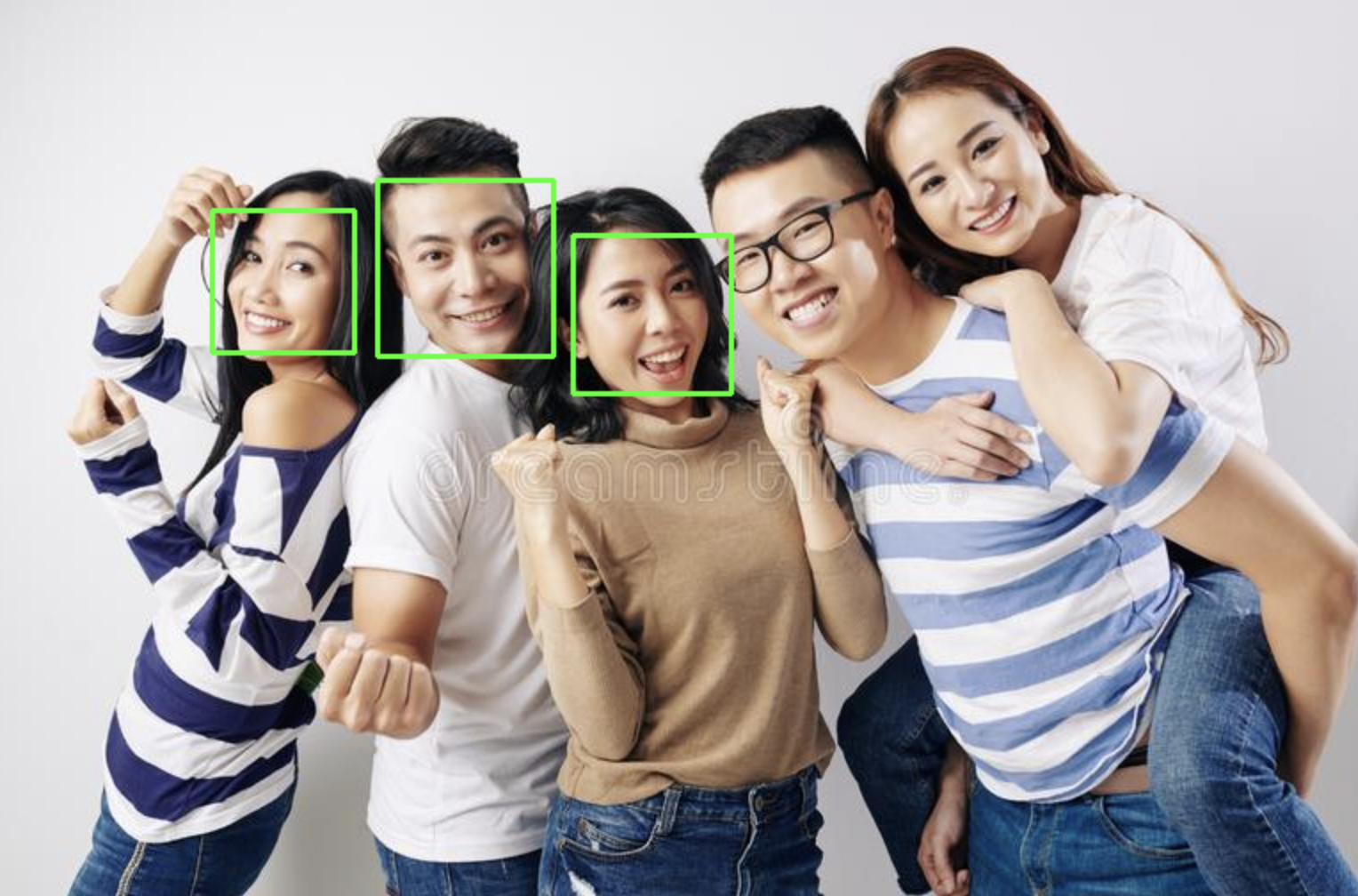
모든 경우를 인식하지는 못하는 것 같다.
'dev > Python' 카테고리의 다른 글
| 진짜 이상한 Python의 del (0) | 2023.12.11 |
|---|---|
| [Python] OpenCV로 image size 조절하기 (0) | 2023.01.01 |
| [Python] image 파일 numpy.ndarray로 불러오기 (0) | 2023.01.01 |
| [Data][Python] Pandas + Numpy example (0) | 2022.01.10 |
| [Data][Python] Pandas example (0) | 2022.01.10 |
Comments